LinkedIn
  You-tube



Every organization from startups to enterprises deals with employee expenses: travel, meals, mileage, office supplies, per diem allowances, and more. Without a structured, automated process, these expenses create administrative overhead, compliance risk, delayed reimbursements, and friction for employees.
Microsoft has just changed the game with the Expense Agent in Dynamics 365 Business Central.
1. What Is the Expense Agent?
The Expense Agent in Dynamics 365 Business Central is a next-generation, AI-powered experience designed to simplify how employees capture, submit, and manage their expenses while giving organizations the control, compliance, and auditability they need.
Microsoft’s north-star vision is simple: make expense management feel effortless for employees. The agent automatically collects, categorizes, and prepares expenses and expense reports. Employees typically only need to review and confirm the results a dramatic reduction in manual effort.
Paper receipts may still need a quick scan, but digital receipts, mileage tracking, and allowances are captured and processed automatically, with no manual data entry required.
“Make expense management feel effortless for employees.”
– Aleksandar Totovic, Principal Product Manager, Microsoft Dynamics 365
2. A New Design Philosophy
What makes the Expense Agent genuinely different is its design philosophy. While existing Business Central agents are optimized for ERP power users, the Expense Agent is built for people who are not ERP users at all field technicians, delivery drivers, sales reps on the road, part-time staff, or project-based contractors.
These employees shouldn’t need to understand financial systems or hold a Business Central license just to submit an expense claim. The agent meets users where they already work:
- Dedicated web app for non-Business Central users
- Microsoft Outlook
- Microsoft 365 Copilot Chat (coming soon)
- Directly within Business Central
Business Central licenses are not required for expense submission outside Business Central. Usage is metered through Copilot Credits a flexible, pay-as-you-go model that aligns cost with actual usage.
3. How the Expense Agent Works
Built AI-first from the ground up Business Central had no native expense management before this – the agent uses model-driven development, continuous learning, and deep integration with Business Central finance capabilities.
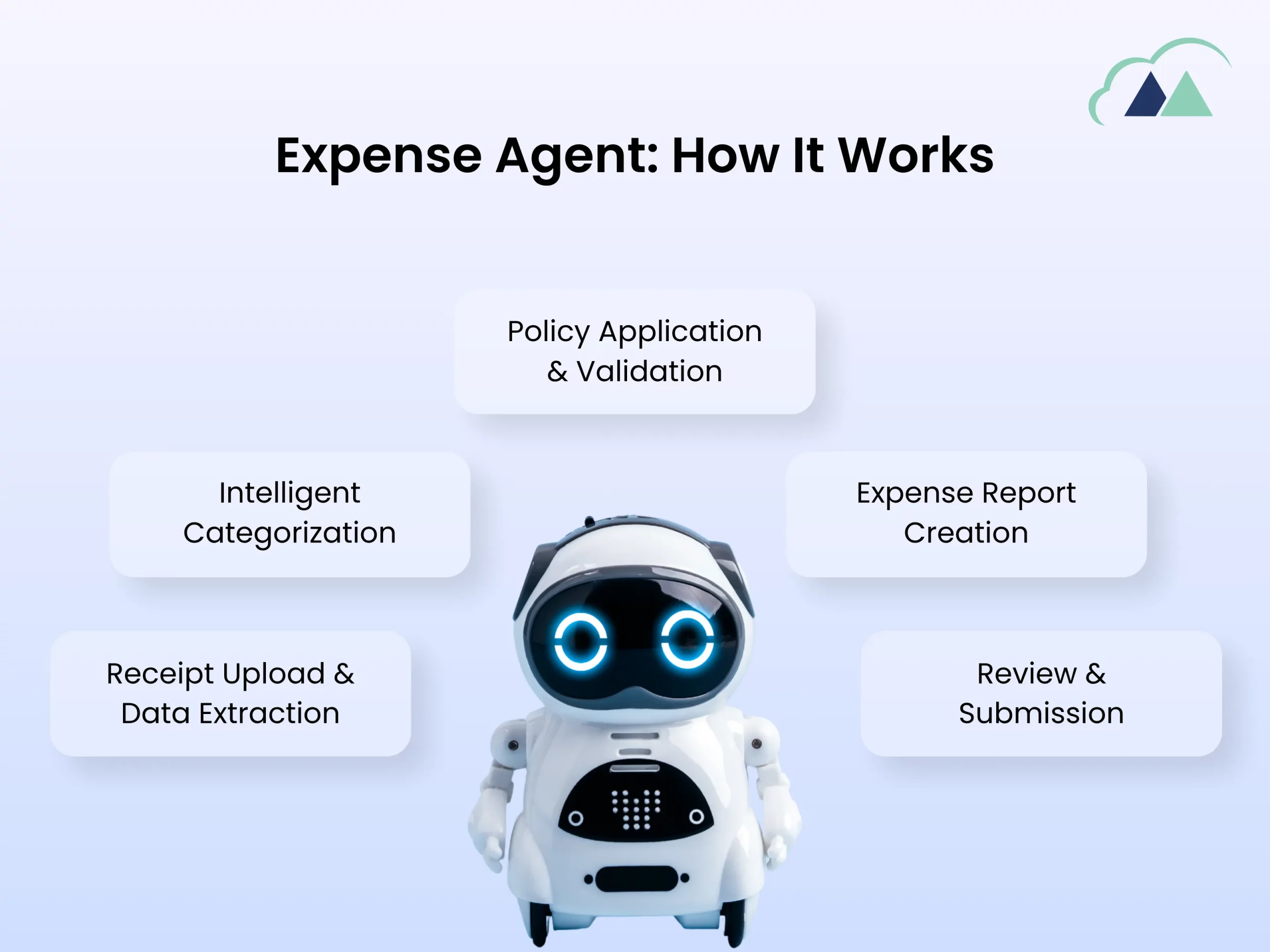
1. Receipt Upload & Data ExtractionThe employee uploads or shares a receipt. The agent extracts all required data vendor, amount, date, currency — across supported languages automatically. |
2. Intelligent CategorizationAI categorizes the expense against configured expense categories meals, travel, accommodation, supplies without manual selection by the employee. |
3. Policy Application & ValidationCompany policies, expense limits, and regulatory rules are applied in real time, flagging non-compliance before submission, silently and automatically. |
4. Expense Report CreationThe agent adds the expense to an existing open report or creates a new one no manual report building required. |
5. Review & SubmissionEmployee reviews the AI-prepared report and submits in one click. No data entry. No guesswork. |
Supported Expense Types
4. Why These Features Are Critically Important
It’s easy to dismiss expense management as an administrative back-office problem. But the cumulative cost of unmanaged, manual, or fragmented expense processes is enormous and the Expense Agent addresses each pain point with a specific, deliberate capability. Here’s why each feature matters deeply.
4.1 AI-First Receipt Capture & Data Extraction
Manual receipt entry is one of the most universal, frustrating, and error-prone tasks employees face. Studies consistently show that employees spend an average of 20 minutes processing a single expense report, and that 19% of expense reports contain errors that require correction each costing an additional $52 to fix on average.
The Expense Agent’s AI-powered extraction eliminates this entirely. When an employee photographs or forwards a digital receipt, the agent reads it vendor name, amount, currency, date, tax breakdowns and populates the expense automatically. This is not a simple OCR tool: it understands context, handles multiple languages, and applies learned patterns from prior submissions.
Why It Matters for Your Business
Every minute an employee spends typing receipt data is time stolen from productive work. For an organization with 100 employees submitting just 2 expense reports per month, eliminating manual entry saves approximately 3,300 hours per year. That’s the equivalent of nearly 2 full-time employees freed for higher-value work. Beyond time savings, AI extraction dramatically reduces transcription errors that lead to rejected claims, delayed reimbursements, and frustrated staff.
4.2 Intelligent Expense Categorization
Incorrect expense categorization is one of the leading causes of audit failures, tax compliance issues, and inaccurate financial reporting. When employees manually categorize expenses, they rely on memory, guesswork, or familiarity with finance codes they rarely use resulting in systematic miscategorization that accumulates into significant reporting errors.
The Expense Agent automatically categorizes each expense based on your organization’s configured expense categories, applying consistent logic every single time. It learns from patterns, understands context (a restaurant receipt during a client visit is likely a “Business Meals” expense, not “Staff Entertainment”), and applies the right category without the employee needing to know your chart of accounts.
Why It Matters for Your Business
Consistent, accurate categorization has a direct impact on three critical areas:
(1) Tax compliance correctly categorized expenses ensure you claim the right deductions and avoid disallowed expenses that trigger audits.
(2) Management reporting — when all travel expenses are coded correctly, your finance team can see true travel spend and make informed policy decisions.
(3) Project profitability for project-based businesses, accurate categorization against project codes means your project P&Ls actually reflect reality. A single miscategorized project expense can make a profitable project appear to lose money.
4.3 Automated Policy Application & Compliance Validation
One of the most costly and time-consuming aspects of expense management is policy enforcement. Finance teams spend significant time reviewing submissions, flagging violations, sending expenses back to employees, waiting for corrections, and then re-reviewing. This back-and-forth cycle delays reimbursements, frustrates employees, and ties up finance resources.
The Expense Agent applies your company’s expense policies automatically at the point of capture before submission. This includes per-category spending limits (e.g., meals capped at a certain amount per day), geographic rules (different limits for different cities or countries), approval routing rules, tax rules, and regulatory compliance requirements. Violations are flagged immediately, with the employee guided to correct them not discovered days later by a finance reviewer.
Why It Matters for Your Business
Pre-submission policy enforcement is transformative for three reasons. First, it converts compliance from a reactive audit process into a proactive prevention mechanism problems are caught before they enter the system, not after. Second, it dramatically reduces the approval cycle time: approvers spend less time reviewing because the agent has already validated compliance. Third, it creates a consistent, defensible audit trail showing that every expense was checked against policy at the moment of submission a critical protection during external audits or regulatory reviews.
4.4 Multi-Surface Accessibility (Web, Outlook, Copilot Chat)
Traditional expense management systems require employees to log into a dedicated portal or ERP system to submit expenses. For field workers, traveling sales teams, or part-time staff, this creates a significant barrier they either delay submissions (causing batching problems) or avoid the system entirely (causing shadow expense tracking in spreadsheets or email).
The Expense Agent’s multi-surface approach meets employees where they already work. A field technician can forward a receipt email directly from Outlook. A traveling sales rep can submit expenses via the Expense Agent web app on their phone. A knowledge worker can submit via Microsoft 365 Copilot Chat without leaving their workflow. No context-switching. No system logins. No friction.
Why It Matters for Your Business
User adoption is the single biggest failure point in expense management implementations. The most sophisticated expense system in the world is worthless if employees circumvent it. By bringing the submission experience to surfaces employees already use daily Outlook, Teams, the browser the Expense Agent removes the adoption barrier completely. Organizations that have deployed similar embedded expense tools report submission rates rising from 60-70% (with traditional portals) to 90%+ because the path of least resistance and the compliant path are now the same path.
4.5 Mileage, Per Diem & Allowance Automation
Mileage and per diem expense management is notoriously error-prone and difficult to audit. Employees manually calculate distances, look up current per diem rates for different locations, and submit amounts that finance teams cannot easily verify. The result is a mix of overstatements, understatements, and inconsistencies that create both cost leakage and compliance exposure.
The Expense Agent handles mileage and allowances automatically: integrating with mapping data for accurate distance calculation, applying the correct government-approved mileage reimbursement rates, and looking up applicable per diem rates based on travel destination. Employees simply indicate they drove or traveled the agent handles the calculations.
Why It Matters for Your Business
Mileage and per diem expenses, while individually small, aggregate to significant amounts and they are disproportionately difficult to audit manually. Automating these calculations with current, accurate rate data eliminates both employee overpayments (cost leakage) and underpayments (a source of employee dissatisfaction and potential labor compliance issues). For organizations with mobile workforces field service, logistics, sales this automation alone can recover thousands in annual overpayments while simultaneously improving employee satisfaction through faster, accurate reimbursements.
4.6 Project Cost Allocation & Billable Expense Reinvoicing
For professional services firms, construction companies, consulting practices, and any project-driven business, the ability to accurately allocate expenses to specific projects and clients is not just an administrative nicety — it’s a business-critical capability that directly affects profitability, client billing accuracy, and contract compliance.
The Expense Agent enables project-related expenses to be posted directly to project ledgers in Business Central, with the correct WBS (work breakdown structure) coding applied automatically based on the project context. Billable expenses are automatically flagged for reinvoicing to the client, creating a seamless link from the employee’s expense submission all the way to the client invoice.
Why It Matters for Your Business
Unbilled billable expenses represent pure revenue leakage. Industry research suggests that professional services firms fail to invoice between 5% and 15% of billable expenses due to manual tracking failures expenses that were incurred for a client project but never made it onto an invoice because the link between expense submission and billing was broken or manual. The Expense Agent closes this loop automatically: every expense flagged as billable flows into the billing queue in Business Central, ensuring nothing is missed. For a firm with $2M in annual billable expense throughput, recovering even 5% of previously lost billing represents $100,000 in additional recovered revenue.
4.7 Configurable Autonomy & Human-in-the-Loop Control
AI autonomy in financial processes is a sensitive topic and rightfully so. Organizations have fiduciary responsibilities, audit obligations, and internal control requirements that cannot be compromised in the name of automation efficiency. Microsoft has designed the Expense Agent with this tension front of mind.
The agent’s autonomy is fully configurable. Organizations can set it to maximum human oversight (agent prepares drafts, humans approve everything), to selective autonomy (agent auto-approves low-value expenses within policy, escalates exceptions), or to high autonomy (agent handles end-to-end processing for standard cases, humans only see exceptions). This spectrum lets organizations start conservatively and expand AI autonomy as trust is established.
Why It Matters for Your Business
Configurable autonomy is what makes the Expense Agent enterprise-ready rather than just a consumer-grade convenience tool. Organizations can start with the agent in “assistant mode” helping employees but not acting independently and progressively increase autonomy as they validate accuracy and build confidence. This approach aligns with how mature organizations actually adopt AI: not with a big-bang deployment that bypasses controls, but with a phased trust-building process. The ability to tune autonomy also means the same tool works for a 10-person SMB that wants full automation and a 1,000-person enterprise that has strict internal control frameworks all from the same platform.
5. Availability & Rollout Timeline
The Expense Agent is currently in private preview. Here is the planned rollout schedule:
Private Preview
Active now. Microsoft is collecting feedback from select customers and refining the core experience.
Public Preview Launch
Part of 2026 Release Wave 1. Initially English only, United States only.
Global Expansion
Additional languages and international country availability begin rolling out.
Full End-to-End Coverage
Complete agent supporting employees, approvers, and finance teams across the entire expense lifecycle.
6. Platform Comparison: Business Central vs NetSuite vs QuickBooks Online
To understand the significance of the Expense Agent, it’s worth placing it in context against the two most commonly compared accounting and ERP platforms: Oracle NetSuite and Intuit QuickBooks Online (QBO). Each platform takes a fundamentally different approach to expense management and those differences have real consequences for businesses of different sizes and complexity levels.
Important Context:- NetSuite and QuickBooks Online do not have native AI-powered expense agents equivalent to Business Central’s Expense Agent as of May 2026. Both platforms rely on integrations with third-party expense tools (such as Expensify, Concur, or Dext) to achieve comparable functionality adding cost, complexity, and data fragmentation.
6.1 Feature-by-Feature Comparison
| Feature | Business Central | Oracle NetSuite | QuickBooks Online |
| Native AI Expense Agent | ✅ Built-in, no add-on required | ❌ No native agent; requires 3rd-party integration | ❌ No native agent; requires 3rd-party integration |
| AI Receipt OCR & Extraction | ✅ AI-native, multi-language | ❌ Via SuiteExpense or Concur integration only | ❌Via Dext, Hubdoc, or Expensify add-on only |
| Auto Expense Categorization | ✅ AI-driven, policy-aware | ❌ Manual or rule-based via integration | ❌ Limited; rule-based only |
| Policy Enforcement | ✅ Real-time, pre-submission, configurable | ❌ Post-submission via approval workflow | ❌ Basic approval workflow; no pre-submission AI check |
| Submission via Outlook | ✅ Native – forward receipt from email | ❌ Not available natively | ❌ Not available natively |
| No ERP License Required | ✅ Yes – Copilot Credits model | ❌ All users need a NetSuite license or seat | ✅ QBO subscription covers all users |
| Mileage Auto-Calculation | ✅ Built-in with rate tables | ❌ Via integration (e.g., TripLog) | ✅ Basic mileage tracking built in |
| Per Diem Automation | ✅ Built-in with location-based rates | ❌ Via SuiteExpense module (extra cost) | ❌ Not available natively |
| Project Cost Allocation | ✅ Direct posting to project ledgers | ✅ Available – NetSuite is project-strong | ❌ Limited project tracking in QBO Advanced |
| Billable Expense Reinvoicing | ✅ Automatic, linked to BC billing | ✅ Available via project billing module | ❌ Manual invoicing process required |
| Configurable AI Autonomy | ✅ Fully configurable (draft to auto-approve) | ❌ Not applicable – no AI agent | ❌ Not applicable – no AI agent |
| ERP Integration Depth | ✅ Native – BC is both ERP and expense engine | ✅ Deep — NetSuite is enterprise ERP | ❌ Shallow — QBO is SMB accounting only |
| Mobile App Expense Submission | ✅ Web app + Outlook + Copilot Chat | ✅ Mobile app available via SuiteExpense | ✅ Native mobile app with receipt snap |
| Approximate Additional Cost | ✅ Copilot Credits usage-based | ✅ SuiteExpense or Concur: $8-20/user/month | ✅ Dext/Expensify: $5-18/user/month |
6.2 Business Central Expense Agent vs Oracle NetSuite
Oracle NetSuite is a powerful, full-featured ERP platform well-suited to mid-market and enterprise organizations. It has deep financial capabilities, strong project accounting, and broad international support. However, its approach to expense management has historically been either reliant on its optional SuiteExpense module or on integration with third-party platforms like SAP Concur.
Where Business Central Wins
The Expense Agent gives Business Central a decisive AI advantage. BC’s expense agent is AI-native it was designed from scratch with AI at its core, not retrofitted onto existing functionality. NetSuite’s SuiteExpense is a capable but traditional module: it processes expenses, enforces policies, and routes approvals, but it does not offer AI-powered receipt extraction, auto-categorization, or configurable AI autonomy. For organizations whose priority is reducing employee friction and manual effort through AI, Business Central’s approach is substantially more advanced.
Where NetSuite Wins
NetSuite retains advantages in enterprise-grade complexity, deeper financial consolidation for multi-entity organizations, and more mature global compliance coverage. For large enterprises with complex organizational structures, multiple legal entities across many countries, or highly sophisticated revenue recognition requirements, NetSuite’s broader ERP depth may outweigh Business Central’s AI expense advantage. NetSuite also has a more established partner ecosystem for advanced expense customizations.
For SMBs and mid-market organizations using or considering Business Central, the Expense Agent represents a leapfrog in AI capability that NetSuite currently cannot match natively. For complex enterprise scenarios with multi-entity consolidation requirements, NetSuite remains a strong contender but it requires additional investment in third-party expense tools to achieve comparable AI functionality.
6.3 Business Central Expense Agent vs QuickBooks Online
QuickBooks Online is the world’s most widely used small business accounting platform, with an intuitive interface, broad integration ecosystem, and accessible pricing. It is an excellent tool for micro-businesses and SMBs with straightforward accounting needs. However, QBO’s expense management capabilities are limited compared to what the Business Central Expense Agent offers.
Where Business Central Wins
The gap is substantial. QBO’s native expense tracking is basic employees can snap receipt photos via the mobile app, but there is no AI-driven categorization, no pre-submission policy enforcement, no per diem automation, no project cost allocation beyond QBO Advanced’s limited project tracking, and no configurable AI autonomy. For any organization that has grown beyond the simplest expense scenarios, QBO requires a third-party add-on (Dext, Expensify, or similar) to achieve functionality that Business Central now delivers natively. The Expense Agent is not just better than QBO’s expense features — it represents an entirely different tier of capability.
Where QuickBooks Online Wins
QBO wins decisively on simplicity, price, and accessibility for very small businesses. If an organization has fewer than 10 employees, straightforward expense needs, and no project cost tracking requirements, QBO’s native receipt snap and basic expense categorization — combined with its very low subscription cost may be entirely adequate. The Expense Agent’s power is overkill for a sole trader or micro-business. QBO also has an enormous app marketplace with many specialized tools for niche industries.
QuickBooks Online is not a direct competitor to Business Central’s Expense Agent they serve fundamentally different organizational needs. As a business grows beyond the micro-SMB stage and begins dealing with project expenses, corporate cards, per diem travel, and multi-step approval workflows, QBO’s limitations become apparent quickly. Business Central’s Expense Agent is purpose-built for this growth stage and beyond.
6.4 Total Cost of Ownership Perspective
A common misconception is that third-party expense tools added to NetSuite or QBO are “free” because they integrate via API. In reality, they add meaningful cost and complexity:
| Cost Factor | NetSuite + 3rd Party | Business Central + Expense Agent |
| Per-user expense tool subscription | $8–20/user/month (additional) | Copilot Credits – pay per use only |
| Integration maintenance | Ongoing API updates, sync errors, re-mapping | None – fully native, no integration layer |
| Data fragmentation risk | High expense data lives in two systems | None – single system of record |
| User training requirements | Two systems to learn (ERP + expense tool) | One experience – Outlook, web app, or BC |
7. Who Benefits, and How?
The Expense Agent delivers value across three distinct groups in your organization:
Employees – Less time on data entry. Faster reimbursements. No need to understand ERP systems. Submit expenses from email, chat, or the web — wherever they already work.
Approvers & Managers – AI-validated, policy-compliant reports arrive cleaner. Fewer rejections, less back-and-forth, faster approval cycles. Approvers only see exceptions, not routine compliance checks.
Finance Teams – Expense data flows directly into Business Central with correct categorization, project allocation, and full audit trails. Less reconciliation. Less chasing. More time for strategic analysis.
8. How Madhda Can Help You Prepare
As a Microsoft Dynamics 365 partner, Madhda Inc. helps organizations implement, optimize, and get maximum value from Business Central. Whether you are already on Business Central or evaluating platforms, our team can guide your journey.
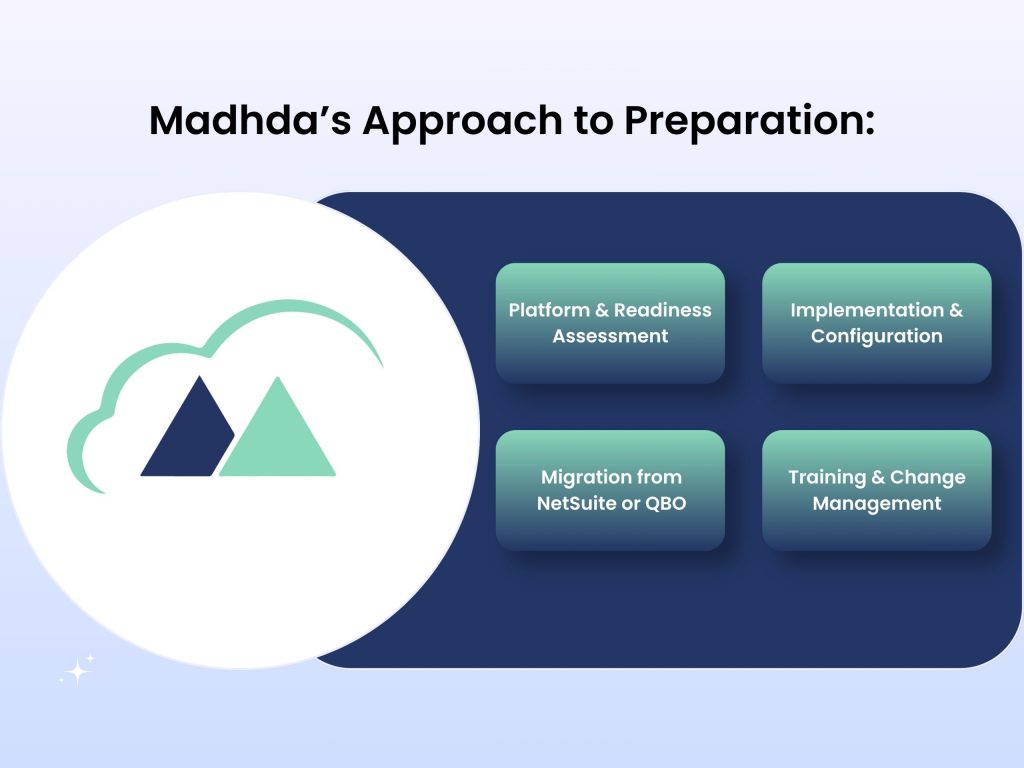
1. Platform & Readiness Assessment
Evaluate your current expense management workflows, identify gaps, and map Business Central’s Expense Agent capabilities to your specific organizational needs including a comparison against your current tools.
2. Implementation & Configuration
Configure expense categories, approval workflows, company policies, autonomy settings, and integration with project ledgers tailored to your business rules and compliance requirements.
3. Migration from NetSuite or QBO
If you’re moving from NetSuite or QuickBooks Online to Business Central, our team manages the full data migration, process redesign, and parallel-run validation to ensure a smooth transition.
4. Training & Change Management
Help your employees, approvers, and finance teams understand and embrace the new AI-powered expense experience maximizing adoption and ROI from day one.
The Expense Agent in Dynamics 365 Business Central is not a minor feature update it is a fundamental rethinking of how expense management can and should work in a modern, AI-powered organization. By building AI into the foundation rather than bolting it on top, Microsoft has created an experience that is genuinely different from anything currently available natively in NetSuite or QuickBooks Online.
The business case is compelling across multiple dimensions: time savings for employees, reduced administrative overhead for finance teams, stronger compliance and audit defensibility, elimination of the cost and complexity of third-party expense integrations, and for project-driven businesses the recovery of billable expense revenue that currently leaks through manual process gaps.
The public preview in May 2026 is just the beginning. Microsoft has committed to a strong backlog of enhancements rolling out through 2026, expanding language coverage, regional availability, and end-to-end automation scenarios. Organizations that engage early whether in the preview or in initial production deployments will be best positioned to realize the full benefits as the capability matures.
Ready to Transform Your Expense Management?
Get in touch with the Madhda team to discuss how the Business Central Expense Agent can work for your organization and how it compares to your current platform.