Talk to Expert

Microsoft 365 Copilot

Work Smarter with
Microsoft Copilot in Dynamics 365 Business Central

Automate workflows, generate insights, and simplify everyday ERP tasks with AI-powered Copilot in Microsoft Dynamics 365 Business Central.

microsoft-copilot-1

+

Projects Completed

+

BPO clients

+

Certified Experts

locations

Copilot Features in Business Central

Explore AI-Powered Copilot Features in Business Central.

Make data-driven decisions with analysis assistance

Business Central has powerful built-in capabilities to create analytical views of data, but manually constructing those views requires time and skill. Copilot simplifies analysis by transforming raw data into clear views with totals, grouping, pivots, and filters – all from simple text instructions and without ever leaving Business Central.

Prompted by just a simple sentence, Copilot can identify trends and anomalies in your data, helping you make data-driven decisions that propel your business forward.

Improve financial stability with cash flow analysis

Business Central can create a comprehensive cash flow analysis to help you monitor your company’s cash position. Cash flow is a critical indicator of a company’s solvency, and cash flow analysis is an important future-focused planning tool that helps you maintain control over your financial health and make proactive adjustments to meet your financial commitments.

With insights from Business Central, you can pivot quickly to safeguard your company’s fiscal wellbeing.

Reduce risk with late payment prediction

Managing receivables effectively is vital for a business’s financial wellbeing. With the late payment prediction extension, you can reduce outstanding receivables and refine your collections approach by forecasting if outstanding sales invoices are likely to be paid on time. For instance, if a payment is anticipated to be delayed, you could modify the payment terms or method for that customer.

By proactively addressing potential late payments and adapting accordingly, you can minimize overdue receivables, reduce risk of non-payment, and ultimately improve your financial performance.

Unlock creativity with marketing text suggestions

Copilot in Business Central helps product managers to banish writer’s block and drive sales with compelling AI-generated marketing text suggestions. Using key attributes already in Business Central like color and material, Copilot can create product descriptions in seconds tailored to your preferred tone, format, and length.
Once you’ve made any adjustments, you can easily publish to Shopify or other ecommerce platforms with just a few clicks.

Transform the way work gets done with Copilot in Business Central

Copilot gives your company an edge with AI-powered innovations that are a catalyst for unleashing human potential, fostering creativity, and driving efficiency in ways previously unimaginable.

The integration of AI into everyday business processes is not just about staying ahead in a competitive market, it’s about redefining what’s possible in the workplace

Reclaim time for important work

Everyday activities like tracking down documents and bringing new employees up to speed can drain your valuable time. Conversational chat using Copilot in Business Central helps you answer questions quickly and easily, locate records faster, and even learn new skills – all using natural language. Save time and effort by navigating to documents without having to use traditional menus, and rapidly onboard new users with answers to questions on how, when, or why to do things.

Automate workflows quickly and easily

Streamlining business processes is easier than ever with Copilot helping to create Microsoft Power Automate flows using natural language. Users can simply express their needs directly in Business Central, and Copilot drafts an initial automation flow for you.

You can continue refining the flow in Power Automate with Copilot by your side, streamlining the process of tailoring best-practice workflows to your business.

Simplify the sales order process

Creating or updating customer orders can be a tedious process, often requiring repetitive lookups or navigating through extensive product catalogs. To quickly add items to a sales quote or order, Copilot enables you to describe the goods or services needed, paste in relevant details from an email, or reference a previous order.

Based on your prompt, Copilot then suggests line items from your product catalog. By streamlining the order taking process, Copilot frees time for sales teams to focus on building relationships and delivering exceptional customer experiences.

Boost customer service with inventory forecasting

Effective inventory management is crucial in a competitive business environment as it can significantly influence a company’s success and customer retention.
Using AI, the sales and inventory forecast extension uses past sales data to forecast future demand, helping to prevent stockouts. Once a shortfall is identified, Business Central streamlines the replenishment process by generating vendor requests, helping you keep your customers happy by fulfilling their orders on time.

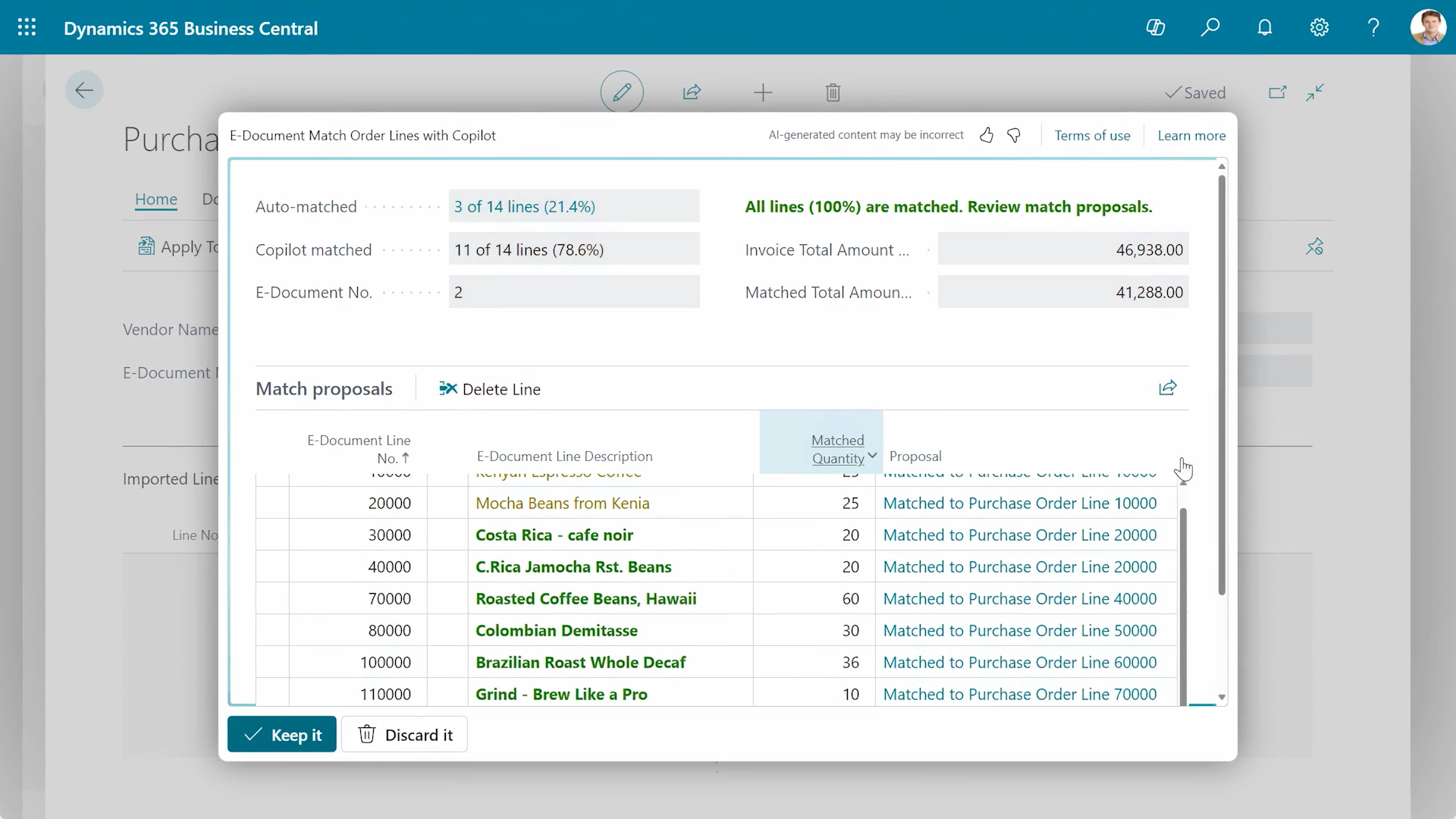
Keep finances organized with e-invoice matching

Say goodbye to hours spent manually merging incoming e-invoices with outstanding purchase orders. Using rule-based matching and assistance from Copilot, you can quickly compare and map incoming e-invoices to your open orders.

Save time and keep your accounts payable current, all while building positive supplier relationships with on-time payments.

Streamline month end with enhanced bank reconciliation

Copilot in Business Central makes bank reconciliation easier by analyzing bank statements that you import into Business Central, matching transactions, and proposing entries for transactions that weren’t auto-matched.

By comparing and interpreting transaction descriptions, amounts, dates, and patterns across fields, Copilot can help you improve the accuracy of your financial records while reducing manual effort.

inventory forecasting

Copilot Capabilities for
Business Central

Natural Language Interaction

Natural Language Interaction

Interact with Business Central using simple, conversational prompts to quickly find data, generate insights, and complete tasks without navigating complex menus.

AI-Powered Content Generation

AI-Powered Content Generation

Automatically create product descriptions, summaries, and business content using existing data, helping teams save time and maintain consistency across operations.

Intelligent Data Analysis

Intelligent Data Analysis

Turn complex financial and operational data into meaningful insights with AI-driven analysis, enabling faster and more informed business decision-making.

Task Automation & Assistance

Task Automation & Assistance

Reduce manual effort by automating repetitive processes like reconciliation, reporting, and order creation with intelligent AI-driven assistance built into workflows.

Role-Based Insights & Productivity

Role-Based Insights & Productivity

Copilot delivers context-aware suggestions based on user roles, helping finance, sales, and operations teams work more efficiently with relevant, actionable insights.

Secure & Permission-Based AI

Secure & Permission-Based AI

Built on Microsoft’s trusted cloud, Copilot ensures data security by respecting user permissions and maintaining compliance with enterprise-grade privacy standards.

Use of Copilot in Microsoft Dynamics 365

Copilot in Dynamics 365 Business Central

Microsoft Copilot in Dynamics 365 Business Central empowers small and mid-sized businesses with AI-driven tools that simplify daily ERP operations and improve productivity.

With Copilot, users can interact with their system using natural language, automate repetitive tasks, and generate insights without technical expertise.


Copilot in Dynamics 365 Business Central

Copilot in Dynamics 365 Finance

Copilot in Dynamics 365 Finance is designed to enhance financial operations by providing AI-powered insights, automation, and intelligent assistance for finance teams.

It enables organizations to manage cash flow, collections, and financial performance more effectively while reducing time spent on manual analysis.

Copilot helps finance teams make faster decisions, improve collections efficiency, and optimize financial performance.

Copilot in Dynamics 365 Finance

Copilot in Dynamics 365 Supply Chain

Copilot in Dynamics 365 Supply Chain Management brings AI-driven intelligence to supply chain operations, helping businesses anticipate disruptions, optimize planning, and improve operational resilience.

It enables teams to move from reactive to proactive decision-making using predictive insights and automation.

Copilot helps organizations improve supply chain visibility, reduce risks, and enhance operational efficiency across procurement, inventory, and logistics.

Copilot in Dynamics 365 Supply Chain

Ready to Bring AI into Your Business Central?

Unlock the full potential of Microsoft Copilot and transform how your business operates with AI-powered ERP.

Book a Consultation

Packages

Dynamics 365 Copilot

Get Your Custom Copilot Pricing

At Madhda, we analyze your specific workflows to build a custom licensing roadmap. Let’s work together to find the most cost-effective path for your business growth.

Start with a Custom Licensing Plan

Why Choose MADHDA

microsoft-icon

Microsoft Certified Partner

As a Certified Microsoft Partner, we guarantee the delivery of tailored business solutions and cutting-edge embedded strategies.

users-team

Proficient Team

Our team consists of highly skilled professionals who are certified by Microsoft implementing Dynamics 365 solutions.

dedicated-support

Dedicated Support

We’ve developed a dedicated support model designed to ensure our clients maintain seamless continuity throughout their processes.

competitive-pricing

Competitive Pricing

Our tailored and top-tier implementations are available at a 40% discounted rate compared to alternative Microsoft implementation partners.

custom-configured

Custom Configured

Based on your existing workflow and in line with your business objectives enhancing the effectiveness of your revenue-generating initiatives.

flexible-delivery

Flexible Delivery

We prioritize your project and recognize your time constraints, ensuring timely delivery in accordance with committed deadlines.

Start transforming your business operations with Microsoft Copilot

Transform your ERP experience with Microsoft Copilot and unlock new levels of efficiency, automation, and insight.

Talk to a Copilot Expert

Frequently Asked Questions

Is Copilot included in Business Central?

Yes, Copilot features are included in Business Central online (with evolving capabilities).

If a user doesn’t have a Microsoft 365 Copilot license, Copilot Chat can’t access the user’s shared enterprise data, individual data, or external data indexed via Microsoft Graph connectors. Users can, however, choose to upload files directly in Copilot Chat. Additionally, if their organization enables metering through Copilot Studio, users can access agents in Copilot Chat that provide focused grounding on specific SharePoint sites, shared tenant files, or third-party data.

When you ask to find a single record, multiple records, or a field from a record, Copilot uses various mechanisms to search for this information. Copilot generates the appropriate sorting and filtering on list pages and their corresponding source tables. It uses the fields on the page and fields on the underlying tables as part of these operations and in its responses.

Generative AI within Copilot in Business Central aligns with Microsoft’s responsible AI principles, including: fairness, reliability, safety, privacy and security, inclusiveness, transparency, and accountability.

Copilot is an AI-powered assistant that helps spark creativity, boost productivity, and eliminate tedious tasks. Copilot in Business Central is the world’s first AI-powered assistant across all lines of business. With Copilot in Business Central, small and medium-sized organizations empower their workers through intuitive AI tools that boost creativity and save time.

Copilot includes a constantly expanding set of capabilities that help users in different roles and tasks. Each Copilot capability defines its own list of supported regions and supported languages. Although most features might be available only in English at first, we aim to unlock more languages and regions over time.

You can extend and enhance Copilot in Business Central by using tools that are part of Business Central’s standard development platform. Learn more in Integrating AI using Developer Tools for Copilot.

You can also connect copilots by using Copilot Studio. In addition, you can implement your own stand-alone AI-powered apps and services that connect to Business Central.

Microsoft empowers people to achieve more through copilots that are adapted to different situations. For example, Microsoft 365 Copilot is the general AI assistant that is intended for working with Microsoft Teams, Excel, and other productivity apps. Copilot in Business Central is the AI assistant that is intended specifically for the Business Central app.


    Get in touch

    Reach Out to Explore Microsoft Copilot in Business Central

    Email Us: sales@madhda.com
    Talk to Expert
    < >
    ×

      Book a Free Demo