LinkedIn
  You-tube


If you’re considering a QuickBooks Desktop upgrade, you’re not alone. With support ending and services being discontinued, businesses are evaluating whether to move to QuickBooks Online – or take a bigger step toward a modern ERP.
For years, QuickBooks Desktop has been the backbone of financial management for small and mid-sized businesses. It was reliable. It worked offline. It felt familiar.
But the landscape has changed.
With Intuit officially discontinuing several QuickBooks Desktop products and ending support for older versions, businesses are now facing a critical inflection point: stay limited or moving beyond QuickBooks Desktop.
Let’s break down what this means – and why this could be the right time to modernize your financial systems.
Intuit’s Decision to Phase Out QuickBooks Desktop
Intuit has stopped selling new subscriptions for QuickBooks Desktop Pro Plus, Premier Plus, and Mac Plus, and ended support for QuickBooks Desktop 2021.
This is not just a routine product update. It signals a broader shift toward cloud-first platforms and subscription-based ecosystems.
For businesses still relying on Desktop 2021, this change introduces operational and strategic concerns that cannot be ignored.
What This Means for QuickBooks Desktop 2021 Users
If you’re still using QuickBooks Desktop 2021, here’s what the discontinuation implies:
- No more security patches
- No payroll or banking service integration
- No technical support
- No compliance updates
That means increased exposure to compliance risks, data vulnerabilities, and workflow disruptions.
While the software may continue to function locally, the ecosystem around it gradually weakens – and in finance, ecosystem matters.
Why Did Intuit Make This Move?
The decision aligns with larger industry realities:
1. Cloud Adoption Is Now the Standard
Remote work, distributed teams, and multi-location operations to demand real-time access.
2. Security & Compliance Expectations Are Higher
Cloud platforms offer centralized updates, automated security enhancements, and audit readiness.
3. Integration Is the New Efficiency
Modern businesses require seamless integration across CRM, banking, inventory, payroll, and analytics systems.
Supporting multiple legacy desktop versions limits innovation. Consolidating cloud solutions allows faster product evolution.
What Does a QuickBooks Desktop Upgrade Really Mean in 2026?
A QuickBooks Desktop upgrade in 2026 is fundamentally different from what it used to be.
In the past, upgrading meant installing the latest version, transferring your company’s file, and continuing operations with minimal change. Today, the conversation has shifted. With discontinued support cycles and reduced desktop product focus from Intuit, an upgrade is no longer just a technical refresh – it’s a structural decision.
1. It’s No Longer Just a Version Update
Previously, upgrading QuickBooks Desktop meant improved features and compliance updates within the same ecosystem.
Now, businesses must evaluate:
- Whether desktop products will remain viable long term
- What secure unsupported versions truly are
- Whether future integrations will continue functioning
An upgrade today may simply delay a larger transition. It does not necessarily future proof your financial infrastructure.
2. It May Require System Migration
For many businesses, a QuickBooks Desktop upgrade involves more than installing new software.
It may require:
- Data restructuring
- Reconfiguration of workflows
- Rebuilding integrations with payroll, banking, CRM, or inventory tools
- Reassessing multi-entity or multi-location setups
In some cases, the “upgrade” becomes a partial migration – either to cloud accounting or to a full ERP system. This is especially true for growing companies whose operational complexity has outgrown traditional accounting software.
3. It’s an Opportunity to Modernize Operations
This is the part many businesses overlook.
A QuickBooks Desktop upgrade is not just about maintaining compliance – it’s an opportunity to:
- Automate manual financial processes
- Improve real-time reporting visibility
- Strengthen internal controls and audit trails
- Integrate finance with operations
- Enable remote accessibility securely
Instead of asking, “How do we keep our current system running?”
The better question in 2026 is:
“How can we use this transition to build a stronger, more scalable financial foundation?”
Because in today’s environment, upgrading software should also mean upgrading capability.
Should You Move to QuickBooks Online – Or Something Bigger?
QuickBooks Online may appear to be the natural next step.
However, many growing businesses quickly realize:
- It’s still accounting software – not a full ERP.
- Operational complexity often outgrows its capabilities.
- Customization and scalability remain limited.
If your business is expanding – more transactions, more departments, multi-entity structure, inventory management, manufacturing, or service operations – it may be time to consider a Modern ERP instead of just another accounting upgrade.
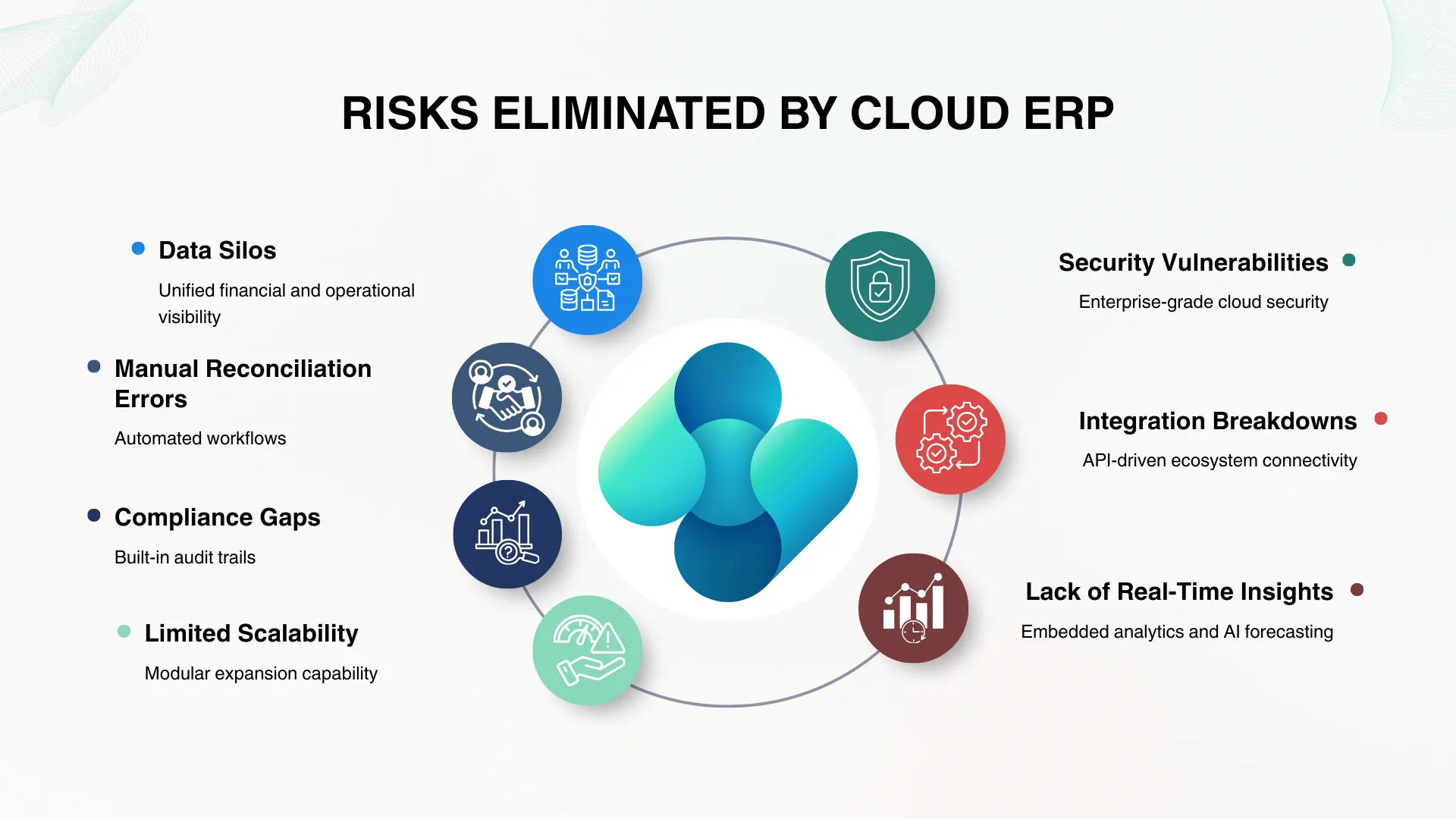
7 Major Risks Eliminated by Cloud ERP
Modern ERP systems eliminate structural weaknesses that legacy desktop systems cannot address:
- Data Silos – Unified financial and operational visibility
- Manual Reconciliation Errors – Automated workflows
- Compliance Gaps – Built-in audit trails
- Limited Scalability – Modular expansion capability
- Security Vulnerabilities – Enterprise-grade cloud security
- Integration Breakdowns – API-driven ecosystem connectivity
- Lack of Real-Time Insights – Embedded analytics and AI forecasting
A cloud ERP doesn’t just move your data online – it transforms how decisions are made.
Why Dynamics 365 Business Central Is the Ideal Upgrade Path
Microsoft Dynamics 365 Business Central is purpose-built for small and mid-sized businesses ready to evolve beyond entry-level accounting systems.
Here’s why it stands out:
1. Familiar Financial Foundation
It offers strong financial management – similar comfort for QuickBooks users – but with far greater depth.
2. End-to-End Business Management
Finance, inventory, supply chain, project management, CRM, and reporting – all in one system.
3. Built for Growth
From single-entity operations to multi-location and global businesses, it scales seamlessly.
4. Real-Time Intelligence
Embedded analytics, AI-driven forecasting, and role-based dashboards empower proactive decisions.
5. Cloud + Microsoft Ecosystem Integration
Seamless integration with Microsoft 365, Power BI, and other Microsoft solutions enhances productivity.
For QuickBooks Desktop users, Business Central feels like a natural evolution – not a disruptive overhaul.
Why Business Central Is a Strategic Upgrade – Not Just a Replacement
Upgrading isn’t about replacing software.
It’s about:
- Moving from bookkeeping to business intelligence
- Moving from data entry to automation
- Moving from reactive reporting to predictive insights
QuickBooks manages accounts.
Business Central manages businesses.
QuickBooks Desktop Online vs. ERP Modernization
Here’s the fundamental difference:
| QuickBooks Desktop Online | Modern ERP Upgrade |
| Version update | Business transformation |
| Accounting-focused | End-to-end operational management |
| Limited scalability | Built for expansion |
| Manual workflows remain | Automation embedded |
The real decision isn’t about software.
It’s about how prepared your systems are for the next stage of growth.
Why Work with Madhda BPO?
Technology alone does not guarantee success. Implementation strategy does.
At Madhda BPO, we specialize in:
- Assessing your current QuickBooks environment
- Designing a structured ERP migration roadmap
- Data migration with integrity and accuracy
- Process re-engineering for efficiency
- Post-implementation optimization and support
As a Microsoft-focused consulting partner, we ensure your transition to Dynamics 365 Business Central is controlled, strategic, and aligned with your growth vision.
We don’t just implement ERP systems.
We help businesses modernize operations with precision.
The Real Question Is Not “Should You Upgrade?”
It is: Can your business afford to operate on a system that is no longer evolving?
If your accounting software is approaching end-of-support, this is not just a technical update – it’s a strategic opportunity.
The businesses that treat this as an upgrade will survive.
The businesses that treat this as a transformation will lead.
Ready to Evaluate Your Next Step?
If you’re currently using QuickBooks Desktop and exploring your options, Madhda BPO can help you assess whether Dynamics 365 Business Central is the right next move.
Your growth deserves more than legacy software.
Follow Madhda BPO Solutions for more financial tips.