LinkedIn
  You-tube



What is SecretText in Business Central?
With the increasing number of integrations, APIs, and cloud-based services, handling sensitive data securely has become a critical responsibility for Business Central developers. To address this, Microsoft introduced the SecretText data type in Dynamics 365 Business Central.
SecretText is a secure string data type designed specifically to store confidential values such as passwords, API keys, OAuth client secrets, and access tokens
Unlike regular Text, values stored in SecretText are protected from accidental exposure through debugging, logging, or UI display.
Where is SecretText Used?
SecretText is best suited for scenarios where data must remain hidden at all times.
Common Use Cases
- Authentication & Authorization: OAuth client secrets, Access tokens, Passwords for external services
- External Integrations: REST API keys, Bearer tokens, Web service credentials
- Azure / Entra ID Integrations: App registration secrets, Certificate password
How to Use SecretText in Business Central
Let’s walk through how developers can implement SecretText step by step.
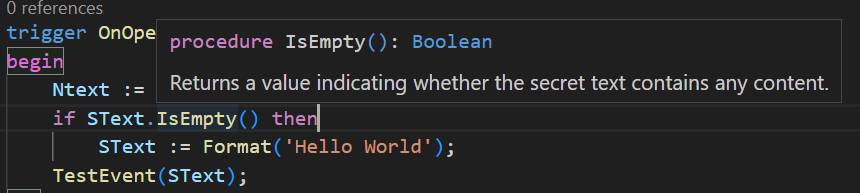
1. There is also the following method in the SecretText type to determine whether it is empty.
Procedure IsEmpty(): Boolean
Returns a value indicating whether the secret text contains any content.
2. Similar to StrSubstNo(Text [, Any,…]) Method, SecretText type includes the following method.
Microsoft introduced SecretStrSubstNo specifically to:
- Allow safe string composition
- Prevent leaking secret values
- Keep secrets hidden from debugger & logs

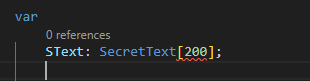
3. Declare a SecretText Variable:
This variable can now securely hold sensitive values.

- Remember you cannot limit the length
- SecretText will be usable as a:
Variable value
Return value
Parameter value
- When debugging, it will be displayed as ‘<Hidden Value> ‘. We cannot access the value.
4. How SecretText Protects Data Internally
One of the biggest advantages of using SecretText is how it behaves behind the scenes. Unlike regular Text variables, SecretText is designed to ensure that sensitive values are never accidentally exposed.
When a developer works with standard Text data types, values can easily appear in logs, error messages, or debugging sessions. This creates a high risk of leaking confidential information. SecretText eliminates this risk by masking the value completely.
For example:
- During debugging, the value is never shown directly
- Logs and telemetry do not capture the actual content
- UI elements cannot directly display SecretText values
This makes SecretText especially useful in production environments where security and compliance are critical. In simple terms, even if something goes wrong in your code, your sensitive data remains protected.
5. Best Practices for Using SecretText
While SecretText is a powerful feature, it should be used correctly to get the best results. Here are some practical tips developers should follow:
- Always use SecretText for credentials instead of plain Text
- Avoid converting SecretText back to Text unless absolutely necessary
- Never log or expose sensitive values intentionally
- Use secure methods like SecretStrSubstNo when working with formatted strings
- Store secrets in a secure source (like Azure Key Vault) and assign them to SecretText
Another important point is to minimize the movement of sensitive data across your code. The less exposure, the better the security.
By following these practices, you can significantly reduce the chances of data leaks in your Business Central applications.
Real Business Central Use Cases
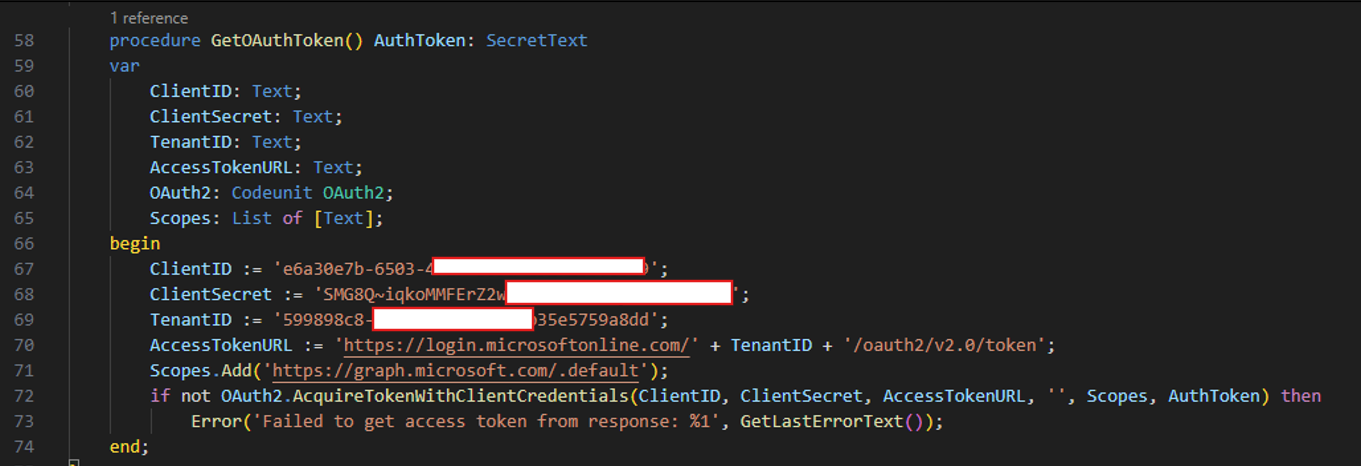
Example: To setup OAuth
Below is a function that returns a SecretText, which is used to securely handle OAuth access tokens, as these are highly sensitive credentials.
Why SecretText Matters in Modern Business Applications
Today’s applications are more connected than ever. With multiple integrations, cloud services, and APIs, the amount of sensitive data being handled has increased significantly.
This makes security not just a feature – but a necessity.
SecretText helps developers:
- Build secure integrations
- Protect user and system credentials
- Reduce risk of data exposure
- Meet compliance and security standards
For businesses using Business Central, this means safer operations and more reliable systems.
Conclusion
SecretText is a small but powerful addition to Business Central’s AL language. It gives developers a secure way to handle sensitive data without adding complexity.
By using SecretText correctly, you can ensure that confidential information stays protected whether it’s during development, debugging, or live operations.
As integrations continue to grow, adopting secure practices like this is no longer optional. It’s a must for building modern, reliable, and secure business applications.
Want to build more secure integrations in Business Central? Get in touch with our experts to build safer and smarter applications.