 LinkedIn
  You-tube
 Lack of Asset Visibility
Many businesses lack a clear understanding of their assets. This makes it hard to track performance and condition.



A powerful application for Microsoft Dynamics 365 Business Central that simplifies asset maintenance, automates workflows, and helps you track performance across the entire asset lifecycle - all within a single system.

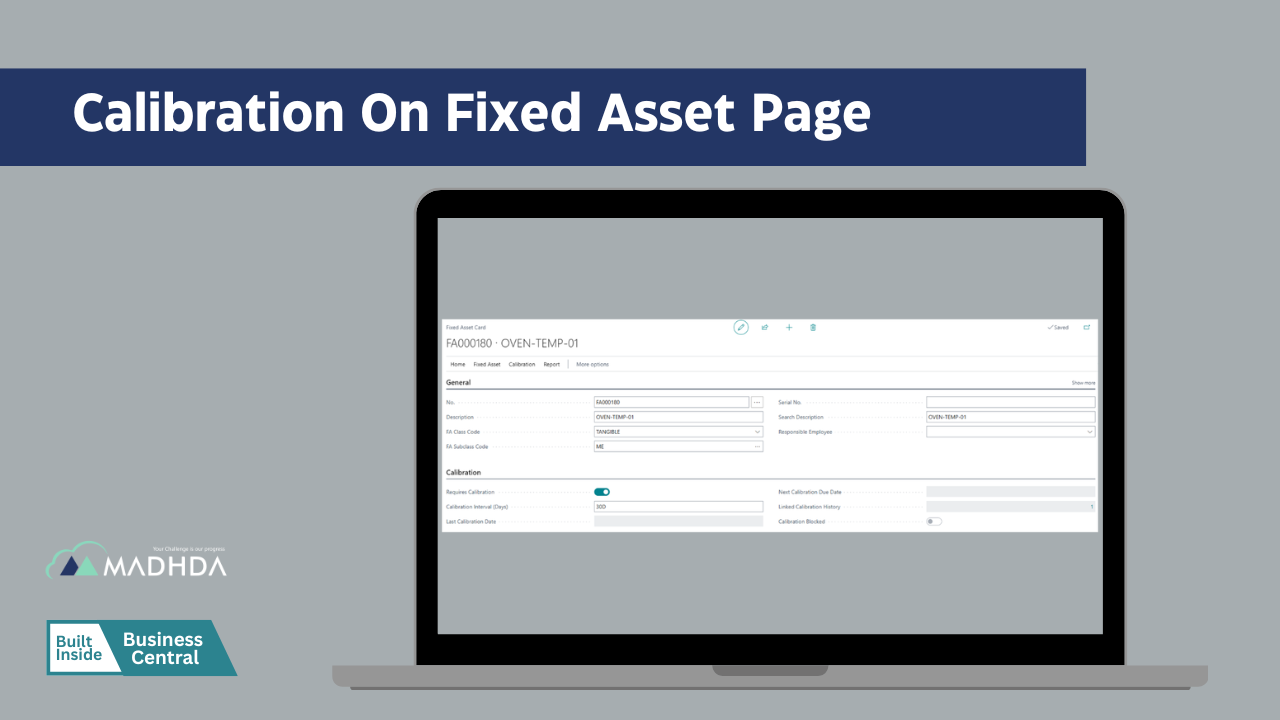
✔ Ability to flag individual fixed assets as calibration required
✔ Asset level activation ensures calibration applies only to quality critical equipment
✔ Mandatory calibration interval definition (in days)
✔ Automatic validation to prevent incomplete calibration setup
✔ System calculated next calibration due date
✔ Realtime visibility of last completed calibration date
✔ Calibration status fully integrated with asset lifecycle
✔ Automated calculation of calibration cycles based on defined intervals
✔ Dynamic recalculation of next due date after every approved calibration
✔ Prevention of manual errors in date handling
✔ System enforcement to avoid skipped or overlapping calibration cycles
✔ Asset level visibility of upcoming calibration deadlines
✔ Automated update of: Last calibration date & Next calibration due date
✔ Event driven recalculation following approvals
✔ Rule based automation removing manual intervention
✔ Improves consistency and reliability of calibration governance
✔ Background job to monitor calibration deadlines
✔ Automated reminders
✔ Repeating reminders for overdue assets
✔ Notifications stop automatically once calibration is completed
✔ Helps prevent missed or late calibrations
✔ Reduces dependency on manual follow-ups

✔ Each calibration recorded as a single, traceable calibration document
✔ One-to-one relationship between asset and calibration event
✔ Support for multiple calibration types:
✔ Controlled creation of calibration documents only for eligible assets
✔ Unique document numbering for audit traceability
✔ Line level recording for detailed calibration evidence
✔ Definition of individual calibration parameters or checkpoints
✔ Capture of acceptance criteria and tolerance limits
✔ Recording of As Found measurement values
✔ Recording of As Left measurement values after adjustment
✔ Conditional or automatic tolerance evaluation
✔ Transparent measurement based validation of results
✔ Automatic determination of pass/fail status per calibration line
✔ Logical rollup of results from line level to document level:
✔ Any failure results in overall failure
✔ Conditional outcomes reflected accurately
✔ Complete pass only when all lines comply
✔ Ensures unbiased and consistent result evaluation
✔ Eliminates manual interpretation risk
✔ Recording of calibration method used for each parameter
✔ Mandatory reference to work instructions or procedures
✔ Capture of master calibration equipment used
✔ Enables full backward traceability to standards and tools
✔ Supports regulatory and audit trace requirements

✔ Structured lifecycle statuses: Open, In Progress, Complete, and Approved.
✔ Status based edit control to prevent unauthorized changes
✔ Seamless transition between operational and quality stages
✔ Automatic locking of records after completion or approval
✔ Clear ownership at each workflow stage
✔ Mandatory approval workflow for failed or conditional calibrations
✔ QA controlled approval with user and approval date tracking
✔ Approval rules enforced automatically by the system
✔ Prevention of approval without required calibration evidence
✔ Approved records become read only for data integrity
✔ Automatic blocking of assets when calibration is overdue
✔ Automatic blocking of assets on failed calibration results
✔ Configurable enforcement to prevent operational usage
✔ Ensures only calibrated and compliant equipment is used
✔ Reduces operational and compliance risk
✔ Calibration cannot be created for non calibrated assets
✔ At least one calibration line required before approval
✔ Calibration dates cannot precede last completed calibration
✔ Approved calibrations cannot be deleted
✔ Ensures consistent, tamperproof records

✔ Ability to attach calibration certificates and documents
✔ Mandatory attachment enforcement for failed calibrations
✔ Centralized storage of calibration evidence
✔ Easy retrieval during audits or inspections
✔ Preserves historical documents with calibration records
✔ Complete calibration history per asset
✔ Full traceability of measurements, approvals, and equipment
✔ Clear linkage between assets, results, and evidence
✔ Designed to support ISO, GMP, FDA, and internal QA audits
✔ Reduces audit preparation effort
✔ Asset wise calibration history reporting
✔ Due and overdue calibration visibility
✔ Calibration result summaries
✔ Certificate ready calibration output
✔ Management oversight for compliance tracking
✔ Ensures measurement accuracy and equipment reliability
✔ Prevents use of noncompliant or failed assets
✔ Strengthens regulatory and audit compliance
✔ Reduces quality related operational risks
✔ Automates governance with minimal manual effort


Many businesses lack a clear understanding of their assets. This makes it hard to track performance and condition.
Without a strong asset management maintenance strategy, equipment can fail without warning.

Manual work and disconnected tools slow down your asset maintenance management system.
Without proper asset maintenance management software, it is difficult to track and manage maintenance costs.

Without proper planning, maintenance is often delayed or missed. This increases the risk of equipment failure.

Managing records manually makes it hard to meet audit and compliance requirements. Missing data can lead to risks and penalties.
Review your current process and define clear goals.

Plan a simple and scalable asset maintenance management system.

Set up assets, workflows, and key settings.
Move your data into a structured maintenance asset management system.

Train your team so they can use the system with confidence.

Launch the system and get ongoing support when needed.
Take control of your asset maintenance with Madhda’s Asset Maintenance Management App—now available on Microsoft AppSource.
Built exclusively for Microsoft Dynamics 365 Business Central, this app empowers your business to move from reactive maintenance to a proactive, streamlined approach all within your existing system.
No complex setups. No disconnected tools. Just a powerful, integrated solution designed to help you manage, track, and optimize your assets with ease.
Start using a simple and reliable asset maintenance management software. Reduce risks, improve efficiency, and stay in control.
Request a Demo



Seamlessly connect your Business Central with ConnectWise PSA to enable real-time, automated, and error-free data exchange across your business improving visibility and efficient business operations.
Explore
TD SYNNEX Connector is a powerful integration app built inside Dynamics 365 Business Central that seamlessly connects your ERP system with TD SYNNEX, enabling automated data exchange, improving accuracy.
Explore
Optimize project and task management with seamless integration between Dynamics 365 Business Central and AutoTask. Track, assign, and manage tasks efficiently, all in one centralized system.
Explore
Simplify port operations, container tracking, and logistics workflows with PortWise 365. Fully integrated with Microsoft Dynamics 365 Business Central for real-time efficiency and control.
Explore
Take full control of your purchasing process with Procure+, the all-in-one procurement solution embedded in Microsoft Dynamics 365 Business Central, and enhance visibility across your organization.
Explore
Notify365 empowers your business to deliver real-time, actionable updates directly from Microsoft Dynamics 365 Business Central using WhatsApp — the world’s most widely used messaging app.
Explore
Our HRMS and Payroll management enables a company to fully understand its workforce while staying compliant with changing tax laws and labour regulations, ensuring accuracy and efficiency.
Explore
Leverage MADHDA's comprehensive IT services. Our solutions, from Dynamics 365 to ERP re-architecting, are designed to optimize your operations, enhance efficiency, and drive business growth.
Explore





