LinkedIn
  You-tube


Is your current accounting software helping your business grow or quietly holding it back?
Choosing the right accounting platform in 2026 isn’t just about bookkeeping. As businesses expand, remote teams become the norm, and real-time visibility becomes essential, finance leaders need software that can scale alongside their operations.
Three platforms dominate the conversation: Xero, QuickBooks, and Dynamics 365 Business Central. Each has its loyal users, strengths, and very real limitations. However,choosing the wrong solution doesn’t just impact your finances – it can slow down growth and create operational bottlenecks.
About These Platforms
Before diving into the comparison, let’s understand what each platform is designed to do.
1. Xero
Xero is a cloud-based accounting platform designed primarily for small and medium-sized businesses. Known for its intuitive interface and strong bank reconciliation capabilities, it is especially popular among startups, freelancers, and accounting firms managing multiple clients.
2. QuickBooks (Online & Desktop)
QuickBooks is one of the most widely used accounting software solutions in North America. Available in both Online and Desktop versions, it offers plans that cater to solopreneurs as well as growing small and medium-sized businesses.
3. Microsoft Dynamics 365 Business Central
Microsoft Dynamics 365 Business Central is an enterprise-grade ERP platform that extends beyond accounting. It unifies finance, operations, inventory, supply chain, sales, and reporting into a single solution.
Built for growing organizations, Business Central provides real-time visibility, advanced reporting, and the flexibility required to scale.
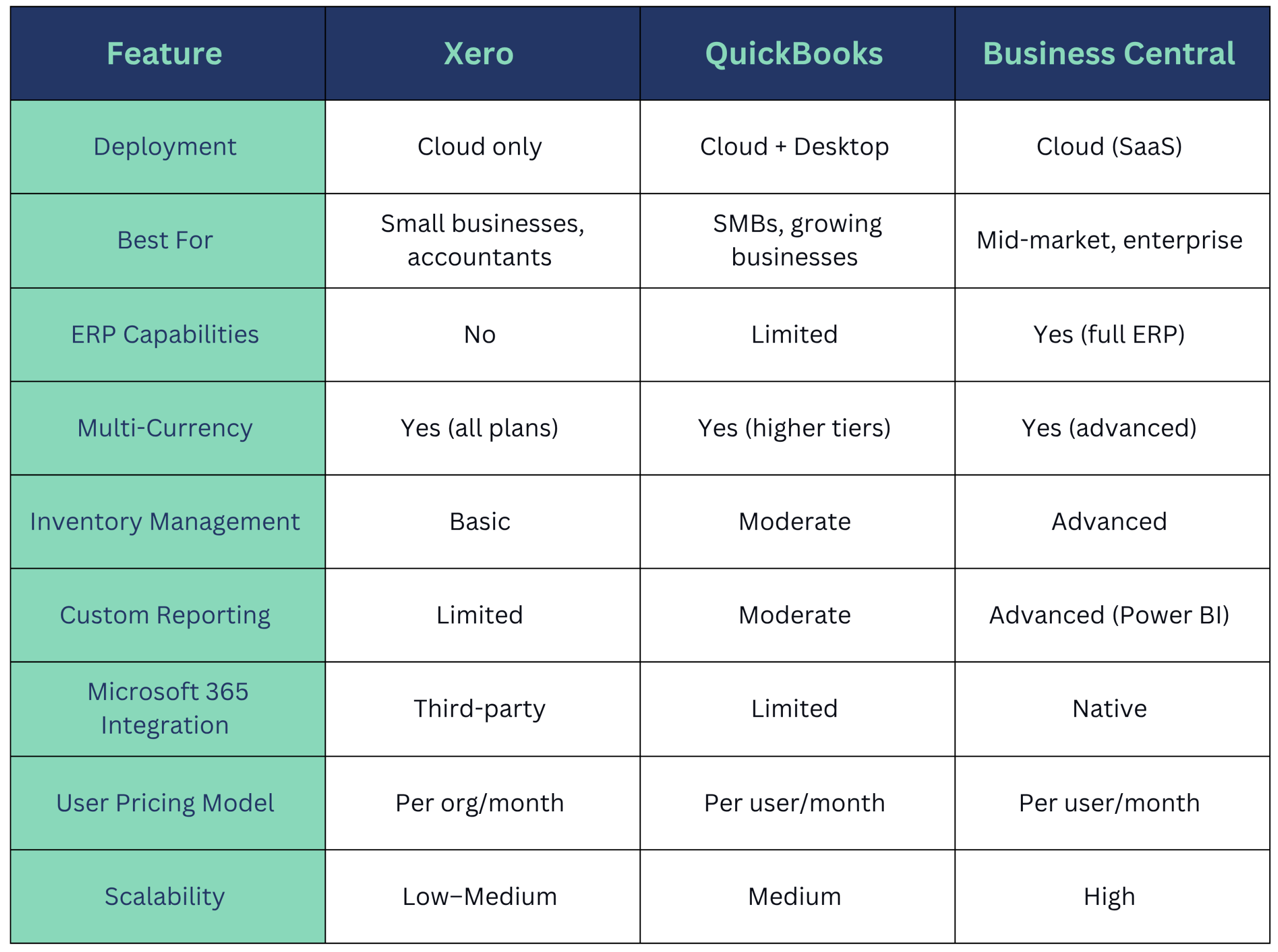
Feature Comparison
Pricing Breakdown (2026)
Understanding the cost structure upfront can save you from a painful surprise down the road.
Xero Pricing
- Starter: ~$29/month – limited invoices and bank transactions
- Standard: ~$46/month – unlimited invoices, no payroll
- Premium: ~$69/month – multi-currency support included
- Add-ons (payroll, expenses, projects) cost extra.
QuickBooks Online Pricing
- Simple Start: ~$30/month – single user, basic features
- Essentials: ~$60/month – up to 3 users, bill management
- Plus: ~$90/month – up to 5 users, inventory, project tracking
- Advanced: ~$200/month – up to 25 users, advanced analytics
Business Central Pricing
- Essentials: ~$70/user/month – core finance, supply chain, CRM
- Premium: ~$100/user/month – full ERP with manufacturing and service management
Madhda Insight:
Although Business Central has a higher per-user cost, it often replaces three to five separate software subscriptions, resulting in a lower total cost of ownership for growing businesses.
Strengths and Weaknesses
Xero: Clean, Connected, and Built for Small Teams
Where Xero Wins:
- Intuitive, user-friendly interface – minimal training required
- Excellent bank feed and reconciliation features
- Ideal for accountants and bookkeepers managing multiple client accounts
- 1,000+ app integrations via the Xero App Marketplace
- Strong multi-currency support across all plans
Where Xero Falls Short:
- Limited inventory and job costing functionality
- Not designed for complex workflows or multi-entity management
- Reporting capabilities are basic without third-party tools.
- Can feel restrictive once a business crosses the 20-employee or multi-location threshold
Best For: Freelancers, early-stage startups, small retail or service businesses, and CPA firms managing client books.
QuickBooks: The Familiar Workhorse
Where QuickBooks Wins:
- Massive user base with abundant support, tutorials, and accountant familiarity
- Strong payroll integration (via QuickBooks Payroll)
- Good project tracking and time management on Plus and Advanced plans
- Desktop version offers deep, offline functionality for specific industries.
- Widely accepted by banks, lenders, and financial institutions.
Where QuickBooks Falls Short:
- Performance can lag with large transaction volumes.
- User limits on lower tiers can be frustrating for growing teams.
- An advanced plan can be expensive without delivering true ERP depth.
- Customer support quality is inconsistent.
- Limited customization for industry-specific workflows
Best For: U.S. based SMBs, contractors, professional services firms, and businesses already embedded in the QuickBooks ecosystem.
Business Central: The Scalable ERP Powerhouse
Where Business Central Wins:
- Full ERP suite – finance, operations, supply chain, HR, and sales in one platform
- Native integration with Microsoft 365, Teams, Outlook, and Power BI
- Advanced inventory, warehouse, and manufacturing management
- Role-based dashboards and real-time reporting out of the box
- Highly customizable workflows with industry-specific extensions
- AI-powered features via Microsoft Copilot (2026 release updates)
- Multi-entity, multi-currency, and multi-language support
- Preferred platform for mid-market companies scaling toward enterprise
Where Business Central Falls Short:
- Higher upfront implementation investment
- Steeper learning curve – requires proper onboarding and training.
- Smaller app ecosystem than Xero or QuickBooks
- Not the right fit for businesses under $1M in annual revenue
Best For: Growing mid-sized businesses, manufacturing companies, distributors, field service firms, MSPs, and businesses outgrowing their current accounting tools.
When Should You Migrate to Business Central?
Businesses often start with Xero or QuickBooks, but certain signs indicate it may be time to upgrade.
Consider migrating to Business Central if:
- Your team is juggling multiple disconnected tools (accounting + CRM + inventory + project management)
- The month-end close takes more than five business days.
- You’re managing multiple entities, locations, or currencies.
- Your finance team relies heavily on Excel because the software can’t produce the reports you need
- You operate in manufacturing, distribution, construction, or HVAC industries with complex operational needs.
- You’re growing fast and need a platform that won’t require another migration in two years.
We’ve helped businesses in construction, HVAC, and professional services migrate from both Xero and QuickBooks to Business Central with zero data loss and minimal operational disruption.
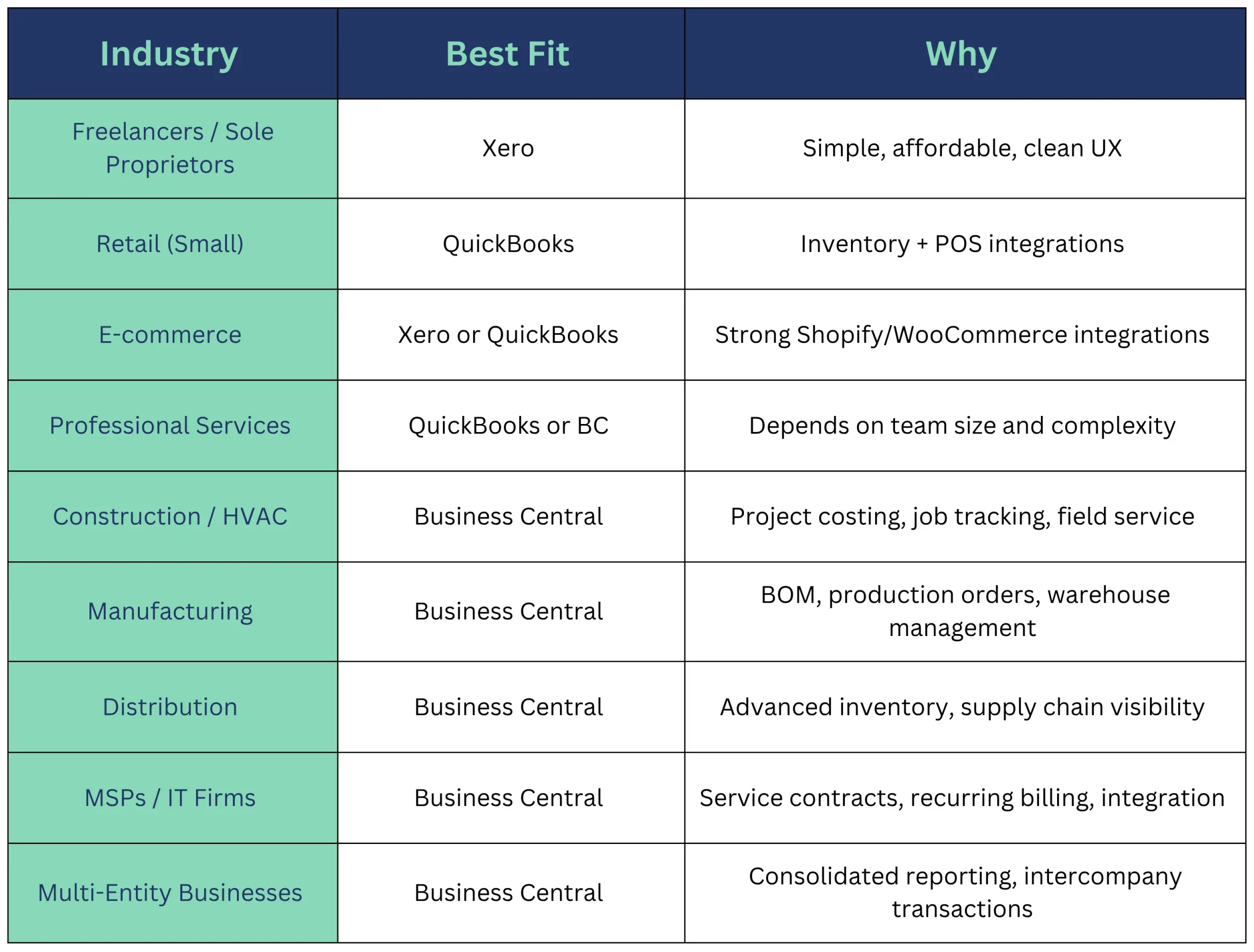
Industry-Specific Fit: Which Platform Works Best Where?
Integrations: Connecting Your Tech Stack
A modern accounting platform shouldn’t work in isolation. Here’s how each stacks up on integrations:
- Xero connects with 1,000+ apps, including Stripe, HubSpot, Shopify, Workflow Max, and Gusto.
- QuickBooks integrates with 750+ apps and has strong payroll, POS, and lending connections.
- Business Central offers native Microsoft ecosystem integration (Teams, Outlook, Excel, Power BI, Dynamics 365 Sales) plus 3,000+ AppSource extensions for industry-specific needs.
For businesses already running Microsoft 365, Business Central delivers unmatched operational continuity data flows seamlessly across tools without third-party middleware.
The 2026 Factor: AI and Automation
One dimension that’s reshaping the accounting software landscape in 2026 is AI.
- Xero has rolled out AI-assisted bank reconciliation suggestions and anomaly detection.
- QuickBooks offers automated expense categorization and cash flow forecasting with Intuit Assist.
- Business Central is pushing the furthest with Microsoft Copilot enabling AI-driven financial summaries, automated invoice matching, natural-language queries across data, and predictive cash-flow insights.
For businesses that want to future-proof their finance stack, Business Central’s deep integration with Microsoft’s AI roadmap gives it a meaningful edge heading into 2027 and beyond.
How Madhda Inc. Can Help
At Madhda Inc., we’re not just familiar with these platforms – we specialize in all three.
- Setting up Xero or QuickBooks for a new entity
- Running on QuickBooks and hitting a ceiling
- Ready to migrate from Xero or QuickBooks to Business Central
Looking for a Virtual CFO to oversee your financial operations post-implementation our team of certified accounting and ERP professionals has done it across dozens of industries, from HVAC and construction to MSPs and multi-national CPA firms.
Our core services include
- Business Central Implementation & Customization
- Xero and QuickBooks Setup & Optimization
- Seamless Platform Migration (with full data integrity)
- Virtual CFO & Controller Services
- Ongoing Support & Training
We work as an extension of your finance team, not just a one-time implementation vendor.
Which Platform Is Right for You?
Here’s the honest summary:
- Choose Xero if you’re a startup, freelancer, or small business looking for simplicity and affordability.
- Choose QuickBooks if you’re an established SMB seeking strong accounting and payroll capabilities.
- Choose Microsoft Dynamics 365 Business Central if you’re a growing business that needs an integrated ERP platform with advanced reporting, automation, and long-term scalability.
The best accounting software isn’t just about where your business is today – it’s about where you want to be three to five years from now.
Ready to Find the Right Platform?
Don’t let the wrong platform become a bottleneck for your growth. The Madhda BPO Service is here to help you implement, migrate, and optimize whichever platform moves your business forward.
Schedule a Free Consultation with Us and let’s build your financial foundation the right way. build your financial foundation the right way.